A curated library of golden prompts designed for end users who want AI to work immediately, without needing to understand prompt engineering.
SECTION // HOW THIS RELATES TO THE PROMPT WORKFLOW LIBRARY
The Prompt Vault and the Prompt Workflow Library solve different problems for different users.
This vault is built for end users: the people who just need a prompt that works right now for a specific task, without needing to understand prompt engineering. Every card is simple, tested, and designed for immediate use.
The Prompt Workflow Library is built for builders and maintainers: the people who design, govern, and refine the prompts that power tools like this one. It contains the full operational infrastructure behind every golden prompt: version history, risk classifications, token intensity ratings, known failure patterns, and the reasoning behind each design decision.
Think of it this way: the Prompt Workflow Library is the kitchen. This vault is the menu.
Most organizations that deploy AI tools face the same adoption gap: the people who build and govern the AI systems are not the people who use them every day. A developer who understands system prompts, token limits, and chain-of-thought reasoning is not the same person as a marketing manager who just needs to write a stakeholder update faster.
The blank prompt box is the enemy of adoption. When a first-time or skeptical user opens Claude or a Custom GPT and sees an empty text field, the most common response is paralysis, not creativity. They do not know what to ask. They do not know what good looks like. They type something vague, get something mediocre, and conclude that AI is not useful for their work.
The Prompt Workflow Library solves this problem for builders and maintainers. The Prompt Vault solves a different problem for a different user: the end user who just needs a prompt that works right now for a specific task, without needing to understand why it works.
SECTION // THE DISTINCTION
The Prompt Workflow Library is the pharmacy's drug reference database. It contains everything a pharmacist needs: full ingredient lists, contraindications, dosage ranges, interaction warnings, and clinical research. It is comprehensive, technical, and maintained by experts.
The Prompt Vault is the pill bottle with plain-language instructions on the label. It tells the patient exactly what to do, when to do it, and what not to combine it with. It contains only what the end user needs to act confidently and safely.
Same underlying knowledge. Completely different interface.
SECTION // WHAT I BUILT
A curated collection of golden prompts organized by job-to-be-done, designed for end users rather than prompt engineers. Every prompt in the vault has been tested, refined, and validated before it is published.
Golden Prompt Criteria
A prompt earns vault status by meeting four criteria: it produces consistent, high-quality output across different users and inputs; it includes plain-language instructions for what to provide; it specifies what good output looks like so the user can evaluate the result; and it has been tested enough times to have a version history with documented failure patterns.
Prompt Card Format
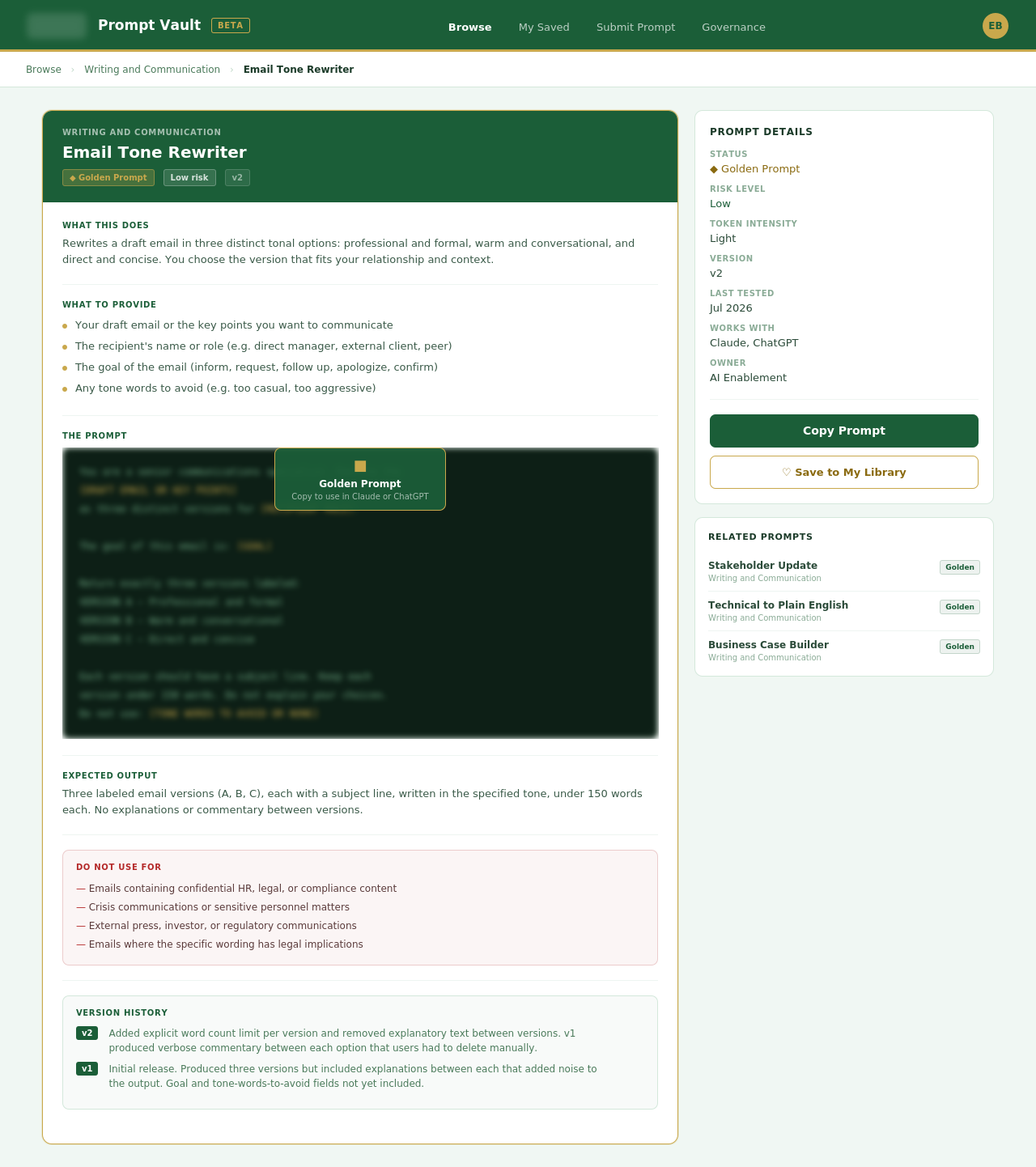
Every vault card contains: What this does (one sentence), What to provide (plain-language input list), The prompt (full text ready to copy and paste with clearly marked placeholders), Example output (sanitized), Do not use for (three to five plain-language boundaries).
Vault Categories
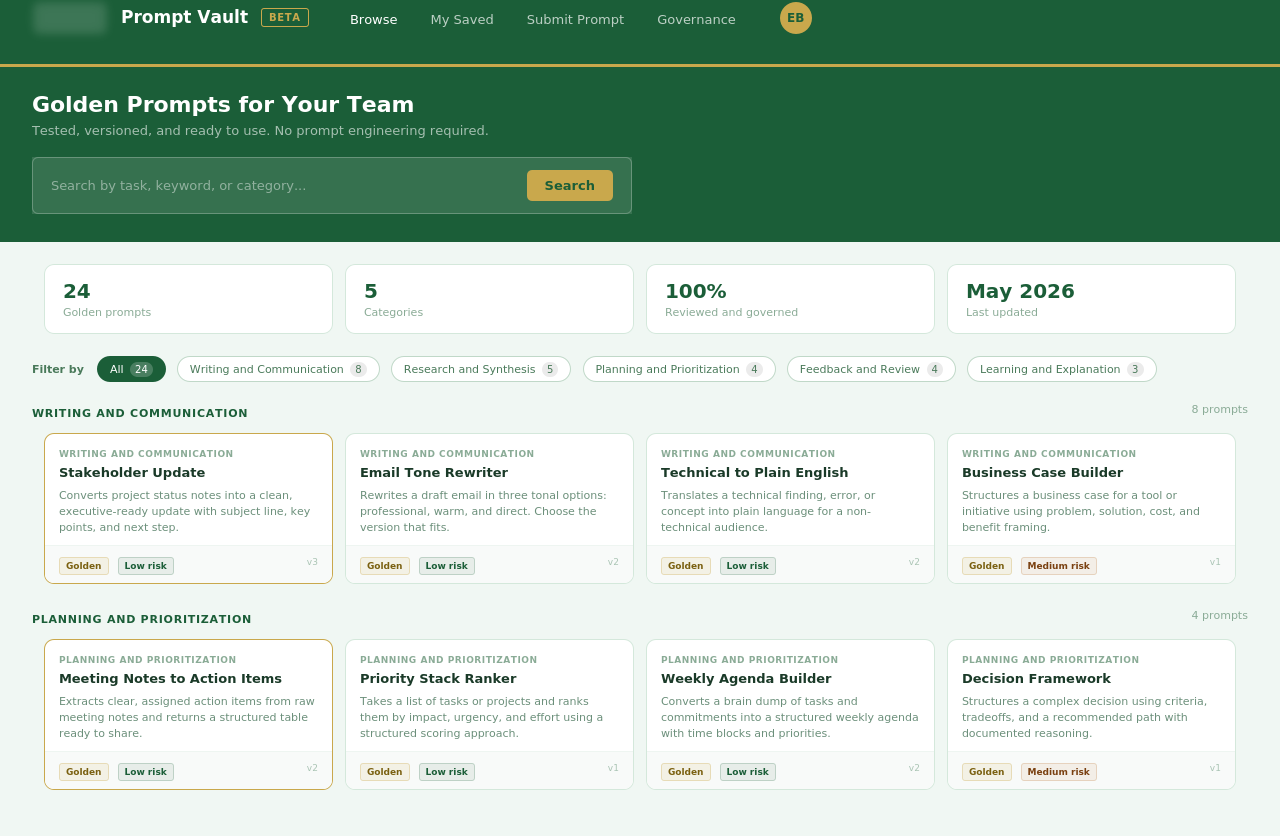
Writing and communication: Drafting, editing, and translating content for different audiences. Research and synthesis: Summarizing, comparing, and extracting key points from source material. Planning and prioritization: Structuring work, building agendas, and organizing complex information. Feedback and review: Evaluating drafts, identifying gaps, and suggesting improvements. Learning and explanation: Breaking down complex topics for different audiences and knowledge levels.
SECTION // INTERFACE AND EXAMPLES
The following screenshots show the Prompt Vault deployed as a SaaS-style internal tool, built in Base44 using organizational branding with identifying details obscured.
Browse interface showing the full prompt catalog with category filters, stats dashboard, and card gridPrompt detail page for Email Tone Rewriter showing the full card structure with the golden prompt content gated
SECTION // HOW IT WAS BUILT
The Prompt Vault interface was built in Base44 using AI-assisted development, the same approach used to build Sonet. The browse interface, prompt detail pages, category filtering, and card structure were designed and deployed without a traditional development team.
Organizational branding was applied using the healthcare not-for-profit's color palette: deep forest green, warm gold, and light sage. Logo and identifying details are obscured in portfolio screenshots to protect organizational privacy while demonstrating that the tool was built for and within a real deployment context.
The Base44 build demonstrates the same principle applied throughout this portfolio: AI accelerates implementation. Human judgment determines what to build and how it should work.
SECTION // PROMPT ENGINEERING METHODOLOGY
Flipped Interaction
Every vault prompt opens by asking the user what to provide rather than accepting whatever the user happens to paste in. The input instructions on each card are the documented version of this: the user answers the card's questions, then runs the prompt. This removes the blank-box paralysis problem and produces more reliable outputs because the AI receives structured inputs rather than open-ended ones.
Constraint Boundary Design (Do-Not-Use-For)
The do-not-use-for field on every vault card is written in plain language for a non-technical audience. It does not say this prompt is not optimized for long-context synthesis tasks. It says do not use this for documents longer than ten pages. The governance principle is identical to the Prompt Workflow Library. The language is different because the user is different.
Outline Expansion
Vault prompts are designed to return structured, immediately usable outputs rather than raw prose. A stakeholder communication prompt returns a formatted update with a subject line, key points, and a recommended next step. The expansion from input to structured output is built into every prompt rather than left to the user to specify.
Tail Generation
Validated vault prompts close by asking Claude or the Custom GPT to reflect back its understanding of the task before delivering output. This gives the user a chance to catch a misread before acting on a wrong result. For end users who are still building confidence in AI tools, seeing the AI confirm its understanding reduces anxiety and builds trust faster than a confident output that might be wrong.
SECTION // THE ADOPTION STRATEGY
The Prompt Vault is not just a prompt library. It is an AI onboarding tool for skeptical or first-time users.
The design philosophy is borrowed from product-led growth: give users an immediate, low-stakes win that demonstrates value before asking them to invest time in learning a new tool. A skeptical employee who uses a vault prompt to draft a stakeholder update in two minutes and thinks that actually worked is far more likely to explore AI further than one who opens a blank prompt box, types something vague, and gets something mediocre.
Every vault prompt is designed to be that first win.
Companion Artifacts
The Prompt Vault is the end-user interface for a broader governance system. Prompt Workflow Library is the back-end infrastructure that maintains the prompts. GPT Governance Brief is the operating model for the agents those prompts power. Together the three form a complete AI enablement stack: governance at the top, operational infrastructure in the middle, and end-user access at the front.
SECTION // OUTCOMES
Removes the blank-box adoption barrier by giving end users structured, tested, immediately usable prompts rather than an empty text field.
Separates the complexity of prompt engineering from the simplicity of prompt use, making AI accessible to non-technical users without requiring them to develop technical skills.
Creates a governed, maintainable prompt surface that can be updated centrally as AI tools evolve, rather than relying on individual users to maintain their own prompt collections.
Establishes a low-stakes onboarding path for skeptical users: a positive first experience with a golden prompt is more effective at driving AI adoption than any training program.
SECTION // WHAT I'D DO NEXT
The immediate next build is a searchable interface: a simple web or intranet page where users can browse vault prompts by category, search by task, and copy prompts directly without navigating a document. The vault content exists. The interface is what makes it feel like a product rather than a folder.
The longer-term vision connects the vault to an AI LMS concept: a structured onboarding experience that introduces new users to AI through a curated sequence of vault prompts, starting with the lowest-stakes, highest-delight tasks and building toward more complex applications as confidence grows.